
Machine Learning in Mobile Applications
PNWSoft created an iOS app that uses a custom machine learning model to identify, score, and generate metrics for target shooting. Existing solutions required that the user identify by hand all of the bullet hole locations in the target. That is a tedious and slow process.
 By utilizing a machine learning model, we were able to have the app automatically identify the type of target, and the location of holes in the paper targets; greatly speeding up the scoring of targets.
This is a great application for machine learning. The problem is well bounded, which allows us to achieve an extremely high detection rate with very low mis-identification.
In general, machine learning is really good at interpolation in a set of results, but fairly bad at extrapolation. This means that in the training set, if you cover almost all of the range of possible outcomes, then the model will perform well. But if the training set doesn't span the entire range of possibilities, then something new will be mis-identified. It is easier to explain with an example. If you trained a model on flying birds, it would be able to identify numerous types of birds. But if you then fed an image of a airplane into the model, it would mis-identify it, and likely consider it some type of bird. It wouldn't necessarily have a very high confidence, but it might still have a reasonably high one. You would have to include images of airplanes in your training set, so that the model would learn those are not birds. If your application isn't one where you can identify the range of possible inputs, then you have ot accept that the model may fail when shown something new. This is a fundamental issue with machine learning, and why not all problems can be solved with it. It is also why creating a good training set is critical. Even with a well founded problem, if you don't generate the training set to span the possible inputs, you will have issues.
In our app, even though we are able to identify pretty much the entire range of possibilities (there really isn't much extraneous stuff on targets, they are standardized), we included a way for users to upload images that did not recognize well, so that we can include them and similar images into the training set. You must view a training set as a ongoing process, that you will continually refine and enhance as your model is used.
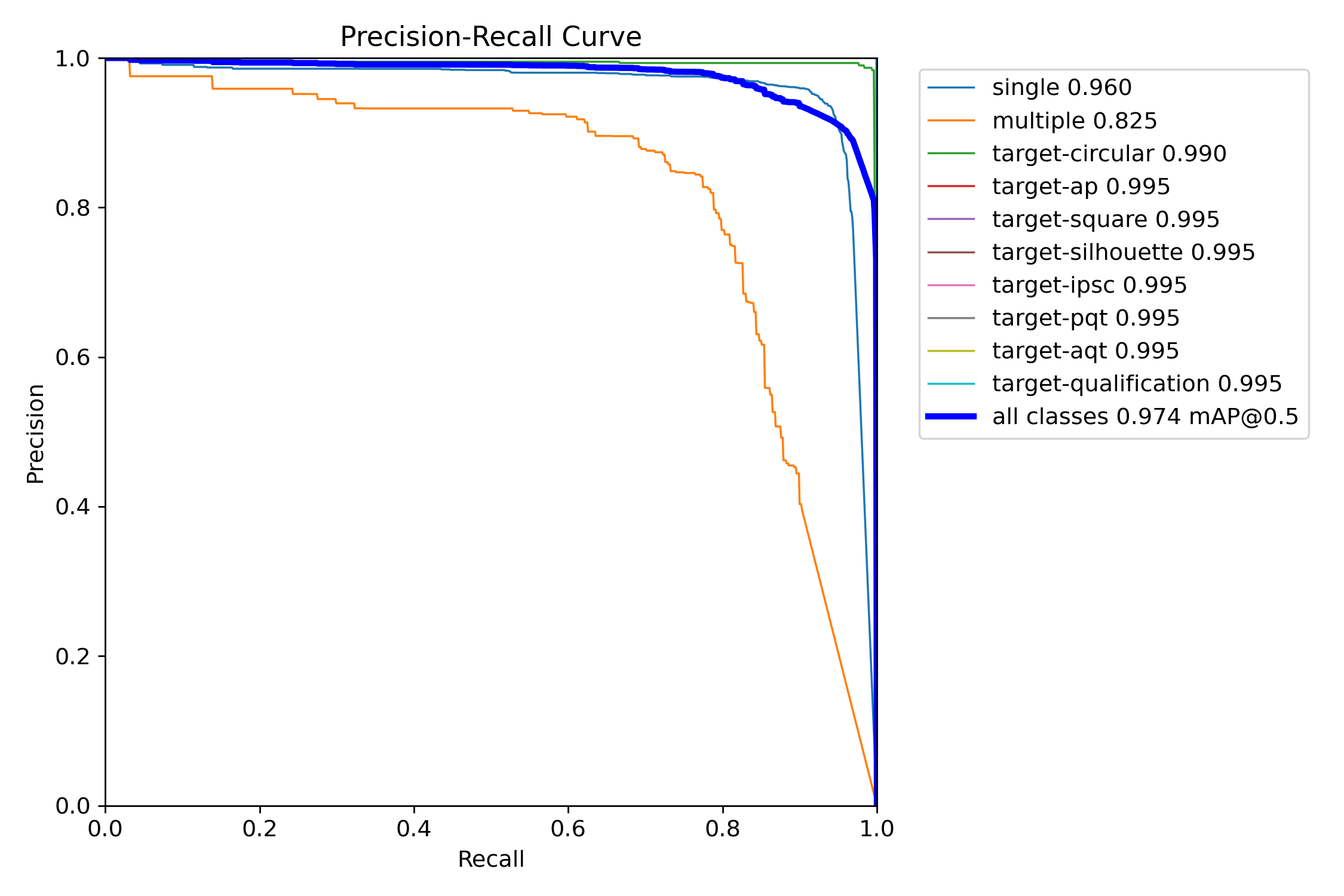 The above graph shows the precision (the ratio of correct identifications to the total amount of identifications) versus the recall (the ratio of the correct identifications to the total number of correct identifications). So precision measures how correct the model's predictions are, and
recall measures how well does the model find all of the items. There is a trade off between the two values. If you guessed that every item in the image was whatever you're looking for, then the recall would always be 1 (every real item was correct identified). Because that metric doesn't care about
false positives. While precision is the opposite. If the model only identified items that it was absolutely sure about, then it would have perfect precision (all items identified were correctly identified). Precision doesn't care about missed items. As you increase precision, you decrease recall and
visa-versa. So, if a model is able to have a high precision and a high recall, then the model is working very well.
The above graph shows the precision (the ratio of correct identifications to the total amount of identifications) versus the recall (the ratio of the correct identifications to the total number of correct identifications). So precision measures how correct the model's predictions are, and
recall measures how well does the model find all of the items. There is a trade off between the two values. If you guessed that every item in the image was whatever you're looking for, then the recall would always be 1 (every real item was correct identified). Because that metric doesn't care about
false positives. While precision is the opposite. If the model only identified items that it was absolutely sure about, then it would have perfect precision (all items identified were correctly identified). Precision doesn't care about missed items. As you increase precision, you decrease recall and
visa-versa. So, if a model is able to have a high precision and a high recall, then the model is working very well.
In our case, because the problem is so well suited to machine learning, we can achieve very high precision and very high recall for most of the items that the model is looking for. For the multiple hit item (which identifies a hole in the target that was made by more than one bullet), we cannot do as well.
This is because of the possible variations of that item. The hole from multiple bullets isn't nearly as well bounded as the other items we look for. If you look at a much less specific set of data such as the COCO data (which is just a common dataset of normal items):
 You can see that curve has a much more rounded shoulder. This is because you can't train on every variant of a human, car, plant, etc. So, when you apply a model that was trained on a subset of possible instances of items, there will be some items that are sufficiently different that the detection
will not work well. As long as your use case can get value from less confident results, the model may still be useful. This is also why the COCO dataset is rarely used in a real problem. It makes a good starting point, but rarely a good finishing point. Almost always, application specific images are
used to train a custom model.
You can see that curve has a much more rounded shoulder. This is because you can't train on every variant of a human, car, plant, etc. So, when you apply a model that was trained on a subset of possible instances of items, there will be some items that are sufficiently different that the detection
will not work well. As long as your use case can get value from less confident results, the model may still be useful. This is also why the COCO dataset is rarely used in a real problem. It makes a good starting point, but rarely a good finishing point. Almost always, application specific images are
used to train a custom model.
We used the Yolo library to train and create the model. This is one of the most common models used for image detection, being originally developed by a student at the University of Washington. We started off with Yolo v5, then v8, and now v11. We tested other models, but didn't see much improvement except for those versions that we listed. Once you have a training set, it is easy to run it with a new version, and see what performance changes you get. This also reinforces how important it is to continually refine the model, to pick up performance gains: not only improving detection rates, but reducing processing and memory requirements.
The model from Yolo was then converted to a CoreML model. This allows Apple's libraries in iOS to run the model efficiently. We're well under one second to process an image, so it appears instantaneous to the user. If you're processing video, then the performance aspect would be much more critical, and you would have to critically balance the speed vs. accuracy. You may choose to lower the accuracy to improve the speed. Even in our application, we built many models with different performance requirements to determine the optimal balance of size vs accuracy. Images are usually either downsized or tiled for processing. All models have a specific image input size (typically 640x640, but many sizes can be used), and this affects the object detection. If you're looking for objects that will occupy most of the image, then a smaller image resolution may work. If you are trying to find an item that will typically occupy a small space in the image, you must process the image at a sufficient resolution that you (and the model) can identify the desired features. Machine learning cannot work miracles, and it cannot detect items where the features are missing.
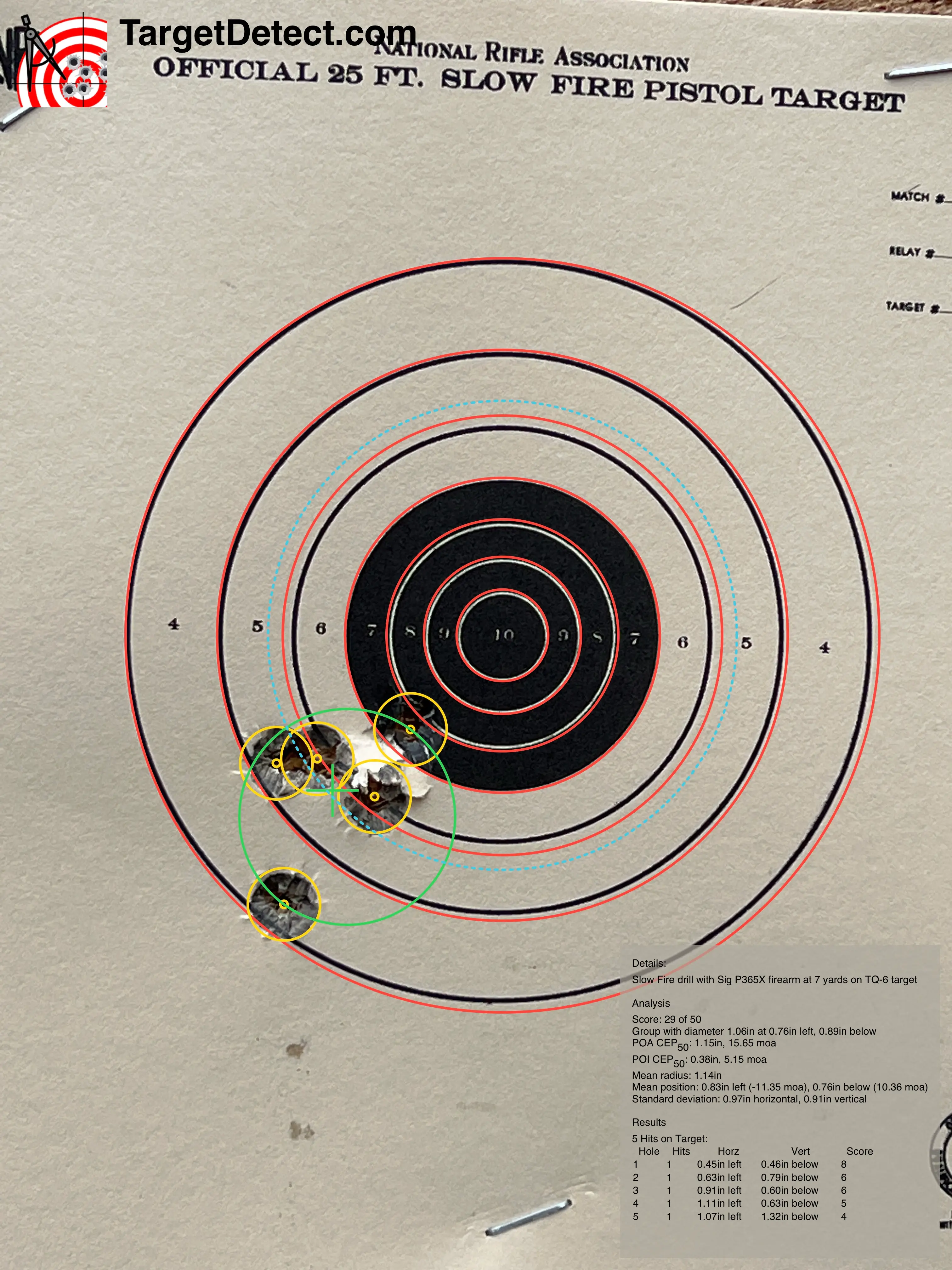 When a well suited problem has a properly trained model, the results can be excellent. The image above shows the recognition on a sample target. The video below, shows the product being used: